Quickstart: first BDS agent
This quickstart covers both agent paths from zero to a running agent. Both start free, both upgrade to a paid plan with native $POWER if you need more credits.
| Path | Best when | Cost |
|---|---|---|
| A — 🦞 OpenClaw one-shot | You are in OpenClaw; the agent gathers inputs in chat and creates a Whale Radar cron from a single prompt | Free (2 credits) → optional 50 $POWER upgrade for 10 more |
B — 🐍 bds-agent CLI | You are running headless or in an external orchestration environment | Free (2 credits) → optional 50 $POWER upgrade for 10 more |
| C — 🌟 Aeon (GitHub Actions) | You fork Aeon and want scheduled whale alerts via Telegram/Discord/Slack without a VPS | Free (2 credits) → metered BDS usage per epoch fetched |
Run bds-agent signup (browser device flow) or sign up directly in the browser at bds-metering.powerloom.io/metering. No wallet, no tokens, 2 free credits credited immediately. The same sk_live_... key works against the OpenClaw skill, the bds-agent CLI, and the hosted MCP server. See Metering & API Keys for the full HTTP/CLI reference.
Both quickstart paths below default to the free-key flow. Wallet-funded pay-signup (50 $POWER → 10 credits + 2 bonus = 12 total) is surfaced as an explicit upgrade sub-section under each path — only required when the 2 free credits run out or you want the autonomous on-chain bootstrap.
Browser signup (no CLI needed)
If you prefer to skip the CLI entirely, you can get your free API key from the browser in three steps:
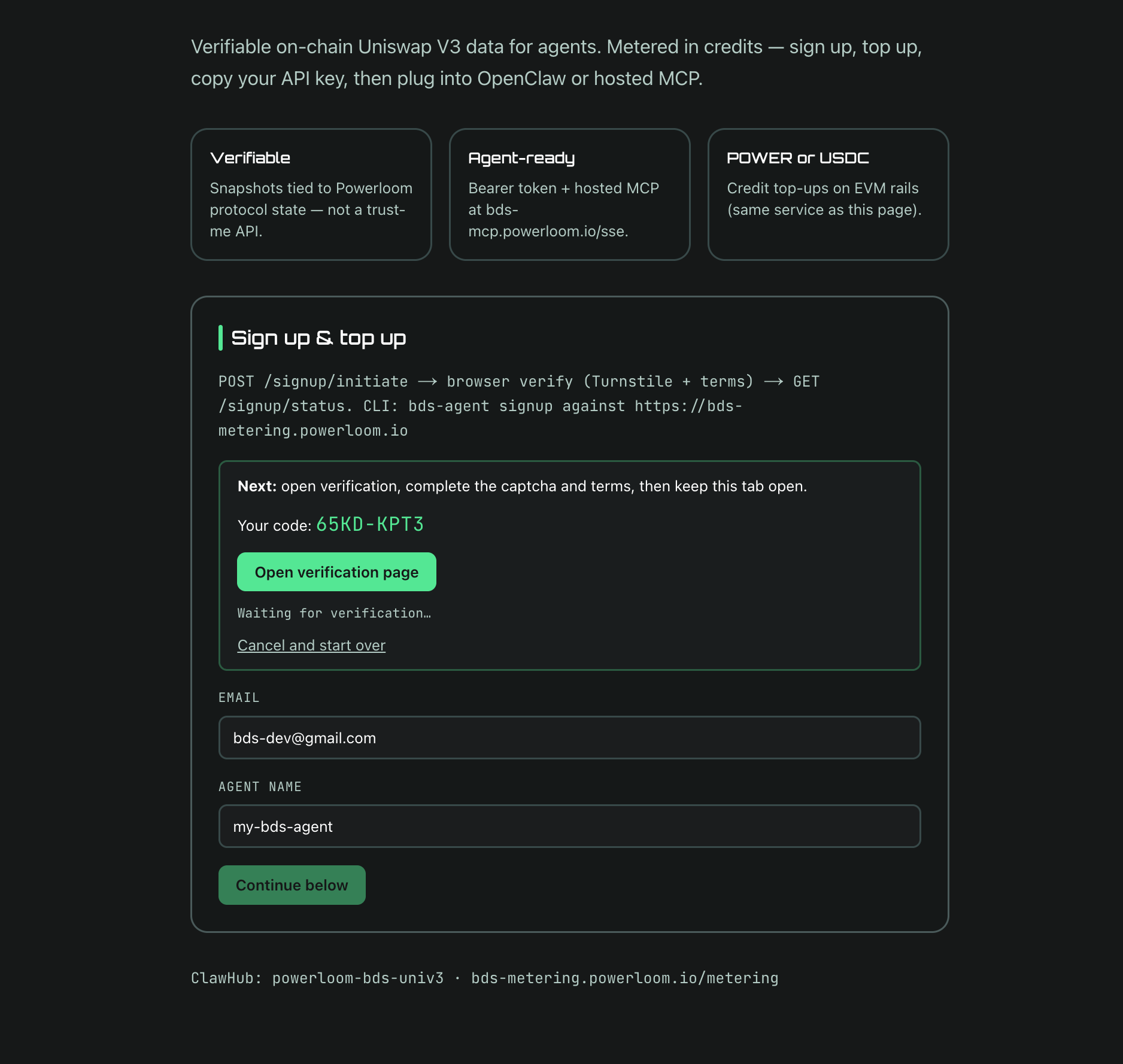
1. Enter your email and agent name at bds-metering.powerloom.io/metering and click Continue. The page generates a verification code and starts polling for completion.
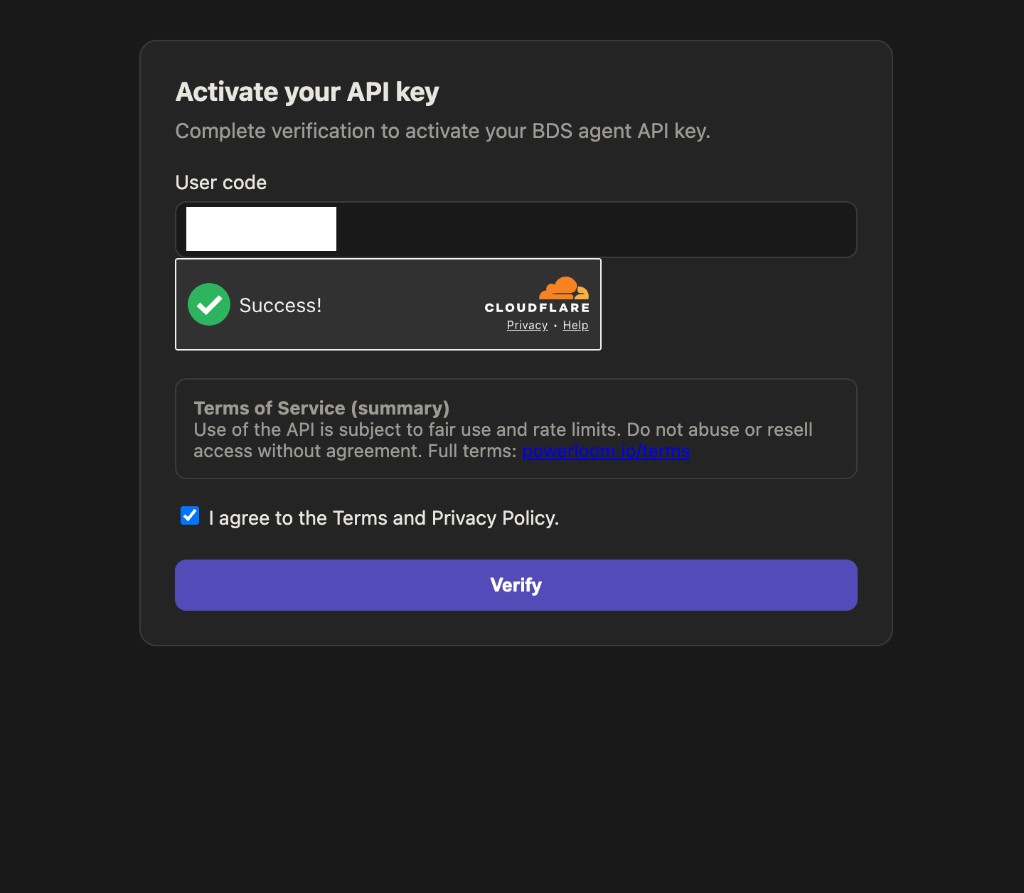
2. Complete Cloudflare Turnstile verification. Click Open verification page, solve the Turnstile challenge, accept the Terms of Service, and click Verify.
3. Copy your API key. The signup page detects verification and displays your sk_live_... key with your org ID and rate limits. Copy it now — the key is shown only once in this flow.
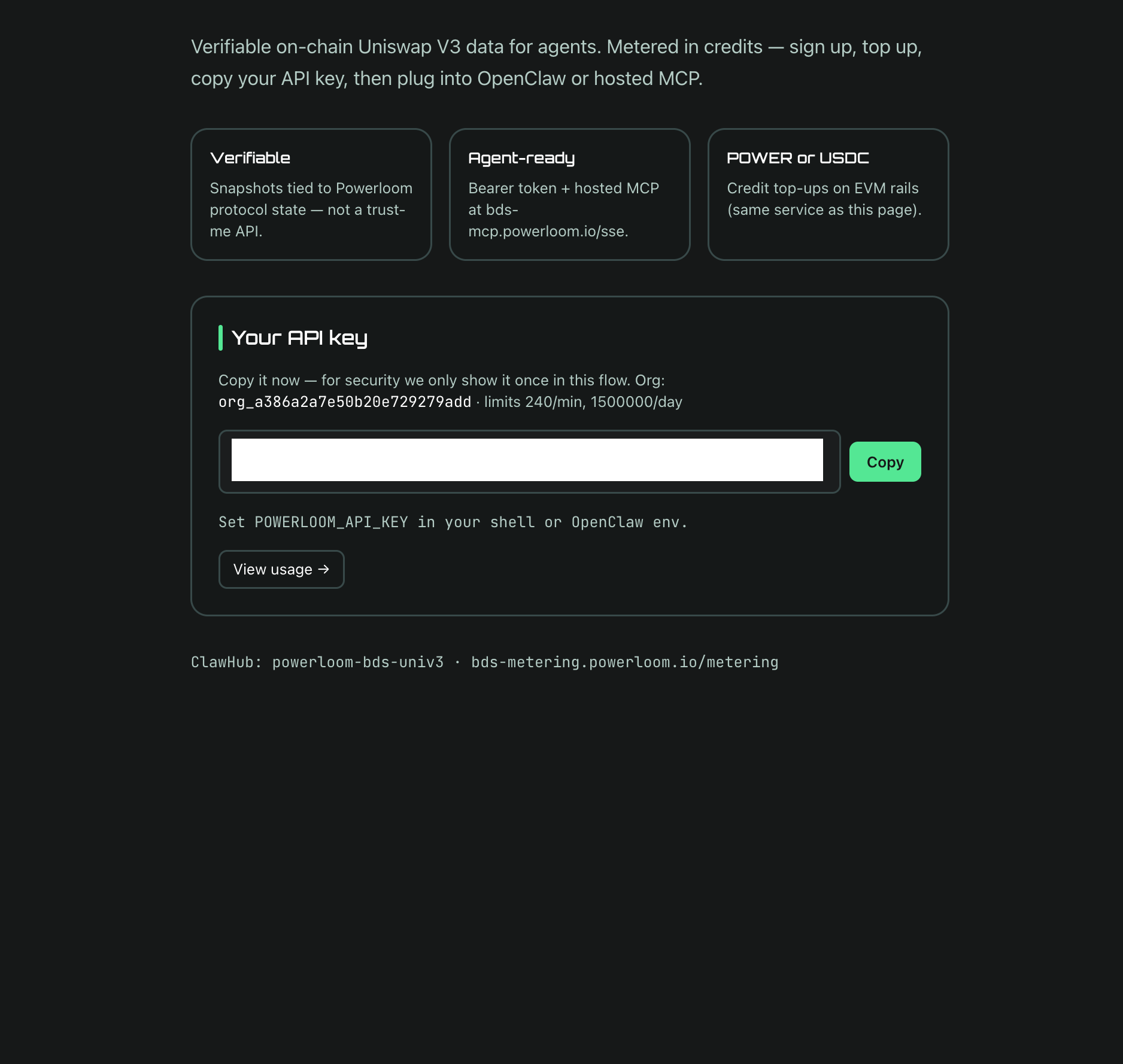
Set POWERLOOM_API_KEY to this value in your shell, OpenClaw env, or MCP client config. The 2 free credits are already on your balance.
Walkthrough: Free API key for BDS: Browser Signup (BDS & Agents playlist).
Path A — 🦞 OpenClaw one-shot (free key)
Walkthrough: Setup Openclaw with free BDS API key (BDS & Agents playlist).
What you need
- 🦞 An OpenClaw environment
node(v20+) available in the agent's shell- An
sk_live_...frombds-agent signup(see the Step 0 tip above — free, 2 credits, browser device flow, no wallet) - Optional: Telegram bot token and chat ID for alert delivery (the prompt asks; "skip" is a valid answer)
Run the one-shot
Paste the prompt below (source on GitHub) as a single message to OpenClaw. The agent first asks you in chat for two inputs — your sk_live_... and your Telegram dispatch decision — then installs the skill, wires the API key into OpenClaw config, and creates a Whale Radar cron job. No wallet, no on-chain payment, no private key.
Install the skill "🦄 Powerloom Uniswap V3 timeseries data" (powerloom-bds-univ3) from ClawHub.
After install, run npm install in the skill directory.

I already have a Powerloom API key (sk_live_...) from `bds-agent signup` — 2 free credits, no wallet needed. Use that key directly. Do NOT run `scripts/signup-pay.mjs`. Do NOT ask for a private key, RPC URL, plan id, chain id, or token symbol.

**REQUIRED INPUTS — gather BOTH from me in chat BEFORE you install the skill, wire any env, or create any cron job. STOP and ask if either is missing. Do NOT proceed to step 1 below until both are resolved. Asking me for any of these AFTER creating the cron is a failure mode — re-ask BEFORE cron creation.**

a. **Powerloom API key** — paste your `sk_live_...` from `bds-agent signup`. If you don't have one yet, run `bds-agent signup` first (free, 2 credits, browser device flow) and come back. Do not invent or guess a key.

b. **Telegram alerts** — ask explicitly: "Do you want Telegram alerts for whale swaps? If yes, paste your `POWERLOOM_TELEGRAM_BOT_TOKEN` and `POWERLOOM_TELEGRAM_CHAT_ID`. If no, type 'skip' and alerts will print to stdout only."
   - If I give you both tokens → use them in the cron env.
   - If I explicitly say "skip" / "no Telegram" / "stdout only" → proceed without TG envs and tell me clearly in the final cron summary that alerts will only print to stdout (the cron `--no-deliver` flag means OpenClaw's chat won't see them either).
   - Do NOT silently default to "stdout is fine." Either both TG values, or an explicit opt-out.
   - Do NOT look up TG credentials from any OpenClaw config source (`channels.telegram`, `openclaw.json`, etc.) — only use what I paste in this conversation.

Once (a) and (b) are resolved in chat, proceed with the steps below.

Set up a whale radar cron with the existing key. Details:

1. Set the gathered envs in OpenClaw under `skills.entries.powerloom-bds-univ3.env.*`:
   - `POWERLOOM_API_KEY` — required, from input (a).
   - `POWERLOOM_TELEGRAM_BOT_TOKEN`, `POWERLOOM_TELEGRAM_CHAT_ID` — set both **only** if I gave you values in input (b). If I opted out, leave both unset; `whale-cron.mjs` prints alerts to stdout in that case (still includes the verification block).

2. Pre-flight: `node scripts/ensure-credits.mjs` to confirm the key is valid and balance is non-zero (free signup grants 2 credits).

3. `scripts/whale-cron.mjs` should:
   - Use `lib/mcp.mjs` `callTool()` for all MCP calls (SSE handshake, not raw HTTP).
   - Use `lib/trade-utils.mjs` `flattenAllTradesFromSnapshot()` to parse the snapshot.
   - Response shape: `result.data.tradeData` = `{ poolAddr: { trades: [...] } }`.
   - Resolve pool token names with `bds_mpp_pool_pool_address_metadata` per unknown pool;
     cache in `.powerloom/pool-metadata-cache.json` (override with `WHALE_CRON_POOL_CACHE`).
   - Verification: `result.data.verification` = `{ cid, epochId, projectId }` — surface in alerts (e.g. ✅).
   - Telegram: `parse_mode: MarkdownV2` with full escaping, or plain-text fallback.
   - If the script is missing or broken, rebuild using the skill's `lib/*` helpers only.

4. Create an OpenClaw cron job — only after REQUIRED INPUTS (a) and (b) above are fully resolved in chat:
   - Name: e.g. "Whale Radar"
   - Schedule: e.g. every 15s (`--every 15s` with `openclaw cron add`)
   - Timeout: 90s (`--timeout 90000`)
   - Session: isolated (`--session isolated`)
   - Flags: `--no-deliver`, `--light-context`
   - Message: a shell command that `cd`s to the skill dir, sets env inline, then runs `node scripts/whale-cron.mjs`. Required env: `POWERLOOM_API_KEY=<value from input (a)>`, `POWERLOOM_BDS_MCP_CALL_TIMEOUT_MS=120000`, `WHALE_CRON_THRESHOLD=10000`. Telegram env only if input (b) yielded values.
   - Do NOT consult OpenClaw `channels.telegram`, `openclaw.json`, or any other config source for Telegram credentials — only use what I pasted in chat for input (b).

5. Before the first run: `rm -f .powerloom/whale-cron-state.json` if you need a clean epoch cursor.
   Keep `.powerloom/pool-metadata-cache.json` across reinstalls unless debugging metadata.

6. Set WHALE_CRON_STATE_FILE and WHALE_CRON_POOL_CACHE to paths outside the skill directory (e.g. in the workspace root) so they survive `openclaw skills install --force`.

Constraints:
- This flow uses an existing `sk_live_...` key only. Do NOT initiate any on-chain payment, and do NOT prompt for wallet credentials.
- Telegram credentials must be gathered from me in chat (or explicit opt-out received) BEFORE the cron job is created.
- Use `bds_mpp_snapshot_allTrades` only (bounded batches). Do not add streaming trade tools.
- Do NOT run the tracker as a background process — use OpenClaw cron only.
- Do NOT show "???" for unknown tokens — resolve via the metadata tool or show the address.
What the agent does
OpenClaw works through the prompt sequentially. The key automated steps:
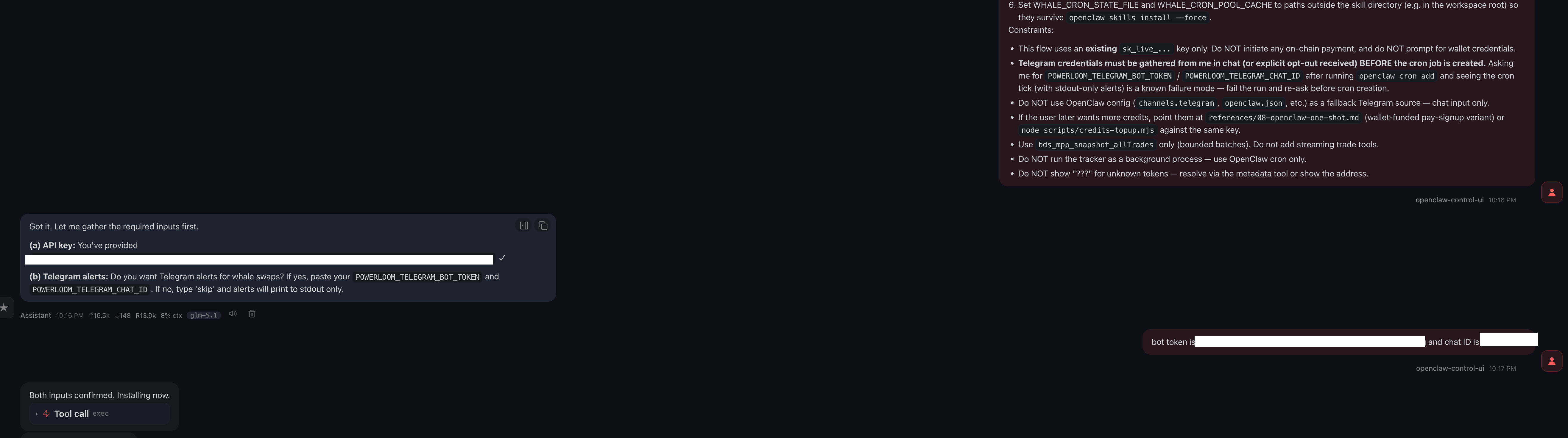
Step 1 — Inputs in chat. The agent's first response is a question:
Got it. Let me gather the required inputs first.

(a) API key: paste your sk_live_... from `bds-agent signup`.
(b) Telegram alerts: Do you want Telegram alerts for whale swaps?
    If yes, paste POWERLOOM_TELEGRAM_BOT_TOKEN and POWERLOOM_TELEGRAM_CHAT_ID.
    If no, type 'skip' and alerts will print to stdout only.
You paste the key, then either both Telegram values or skip. The agent does not proceed past this gate until both inputs are resolved.
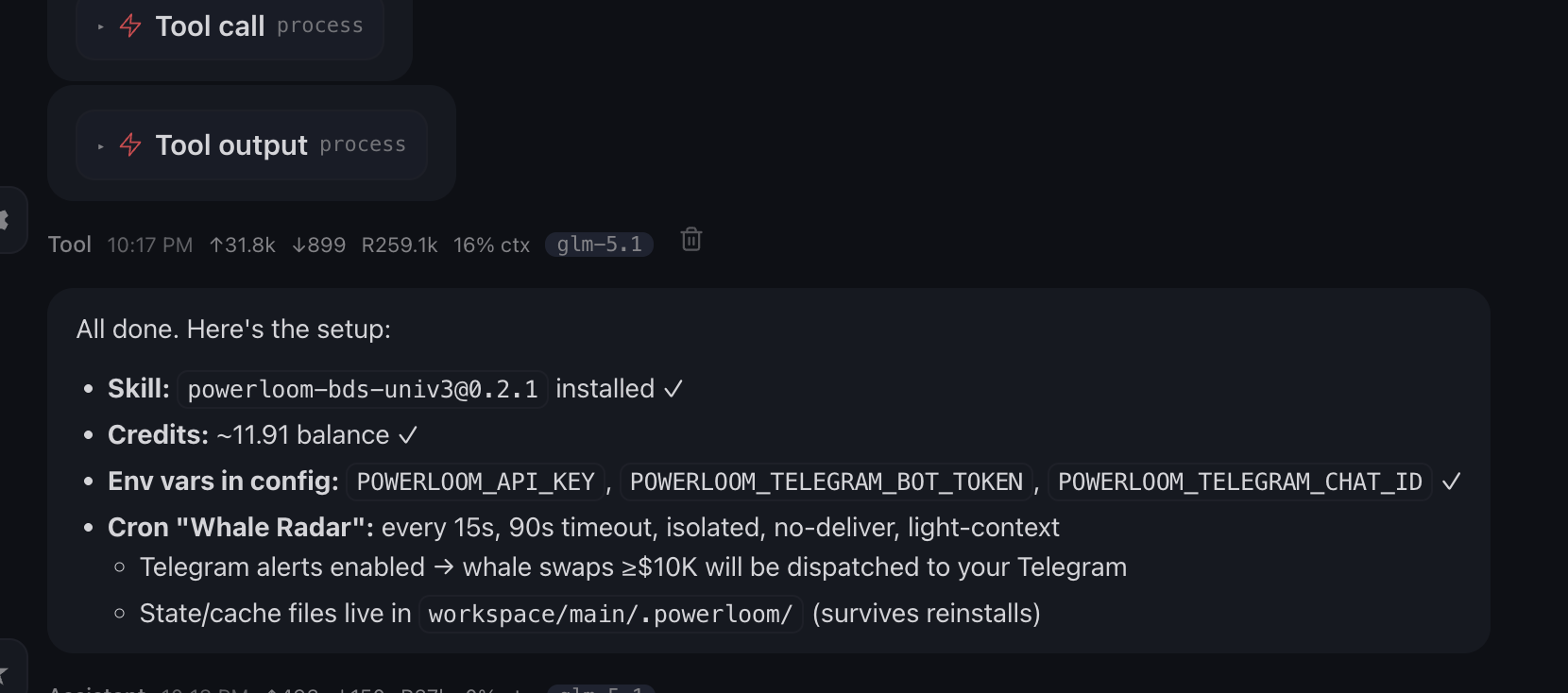
Step 2 — Skill install + env wiring. Once inputs are in, the agent installs powerloom-bds-univ3 from ClawHub, runs npm install in the skill directory, and wires the env under skills.entries.powerloom-bds-univ3.env.*:
POWERLOOM_API_KEY— yoursk_live_...POWERLOOM_TELEGRAM_BOT_TOKEN,POWERLOOM_TELEGRAM_CHAT_ID— only if you provided them
No wallet/plan envs are touched. signup-pay.mjs is not run.
When setup via the free-key flow:
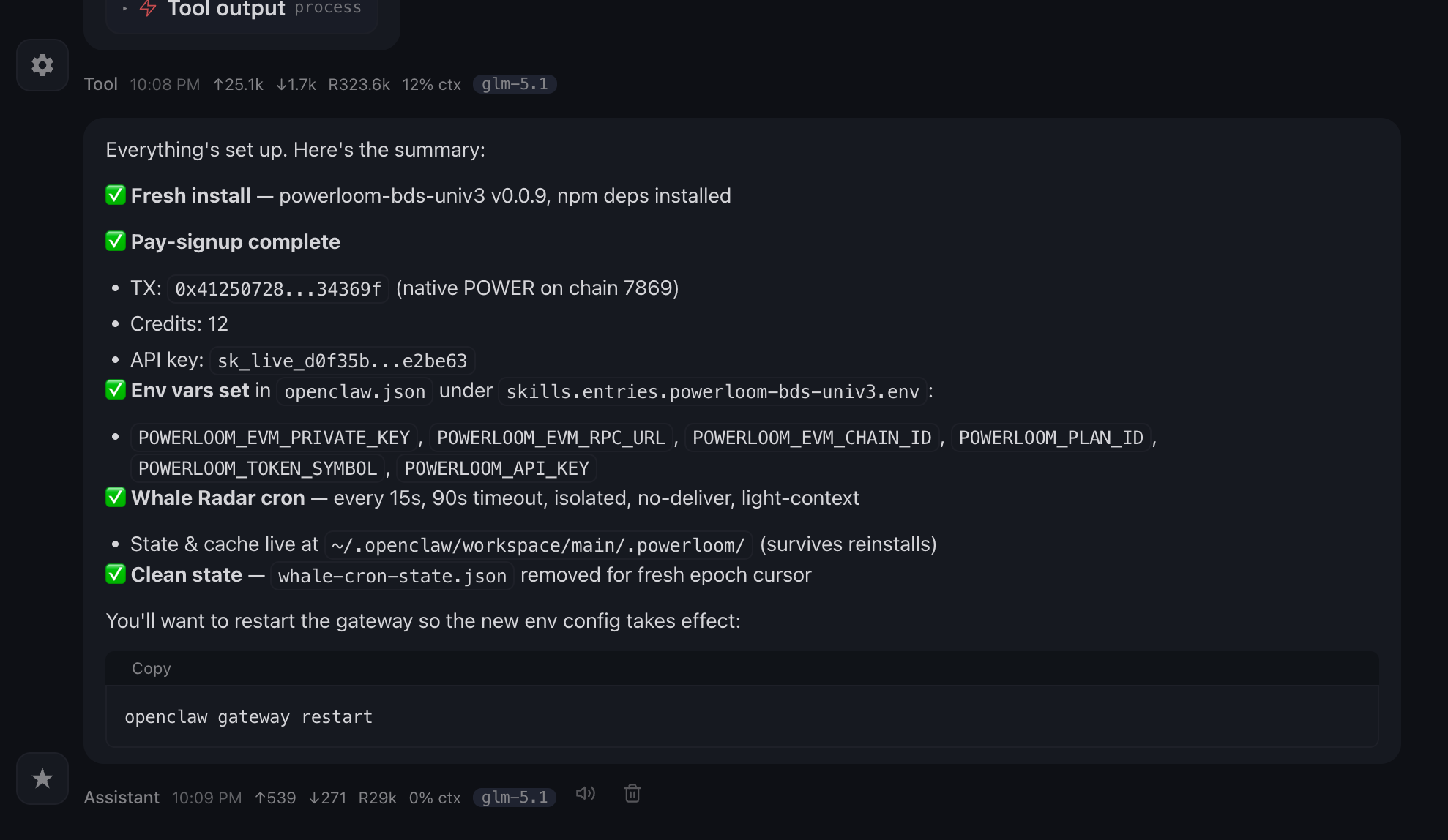
When setup via the wallet-funded paid plan:
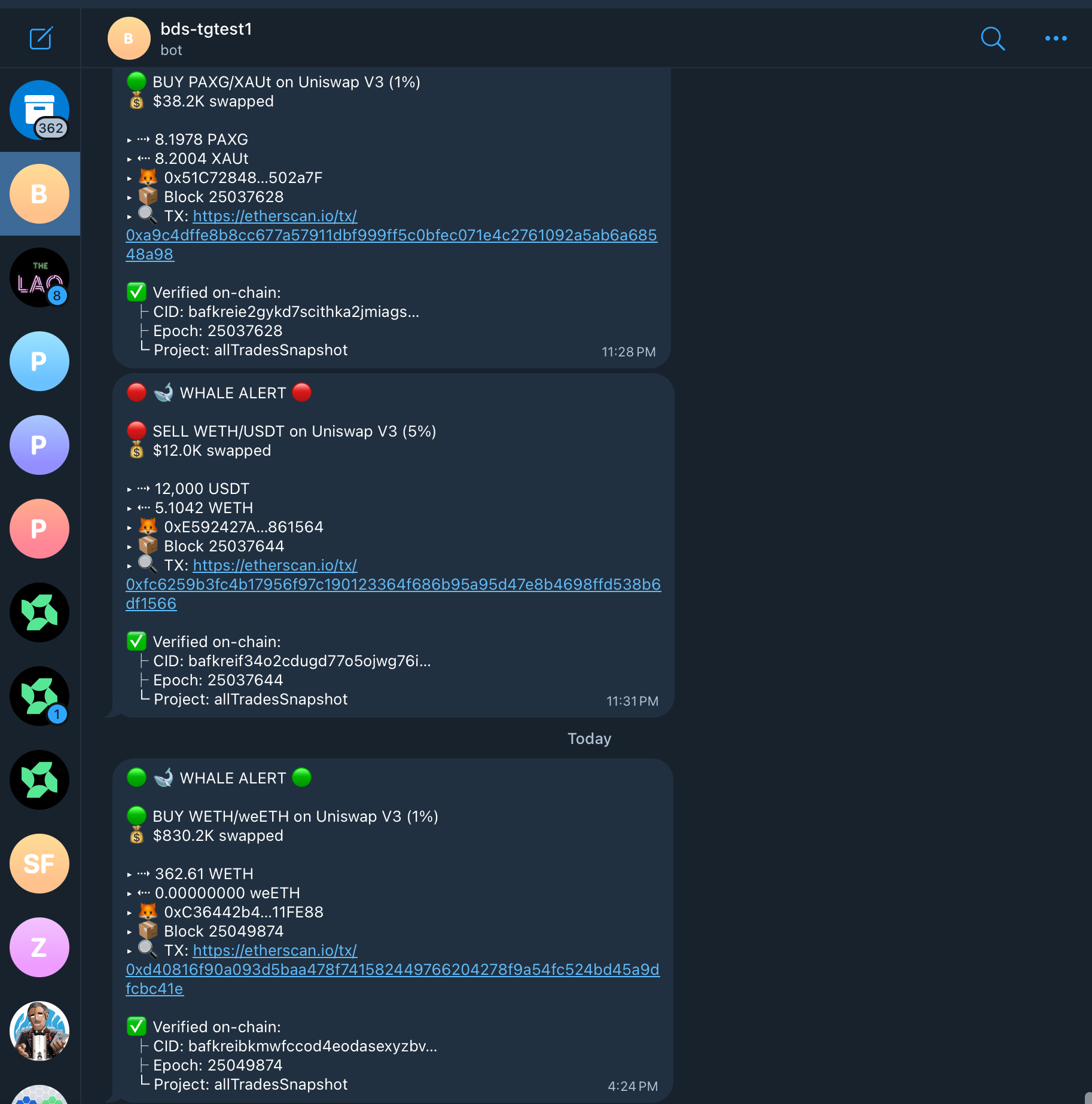
Step 3 — Cron created. openclaw cron add registers the Whale Radar cron. From that point, every 15 seconds the cron fires node scripts/whale-cron.mjs, which fetches a finalized all-trades snapshot via bds_mpp_snapshot_allTrades, filters swaps above the configured USD threshold, and dispatches alerts (Telegram if envs are set, otherwise stdout — both include the verification block).
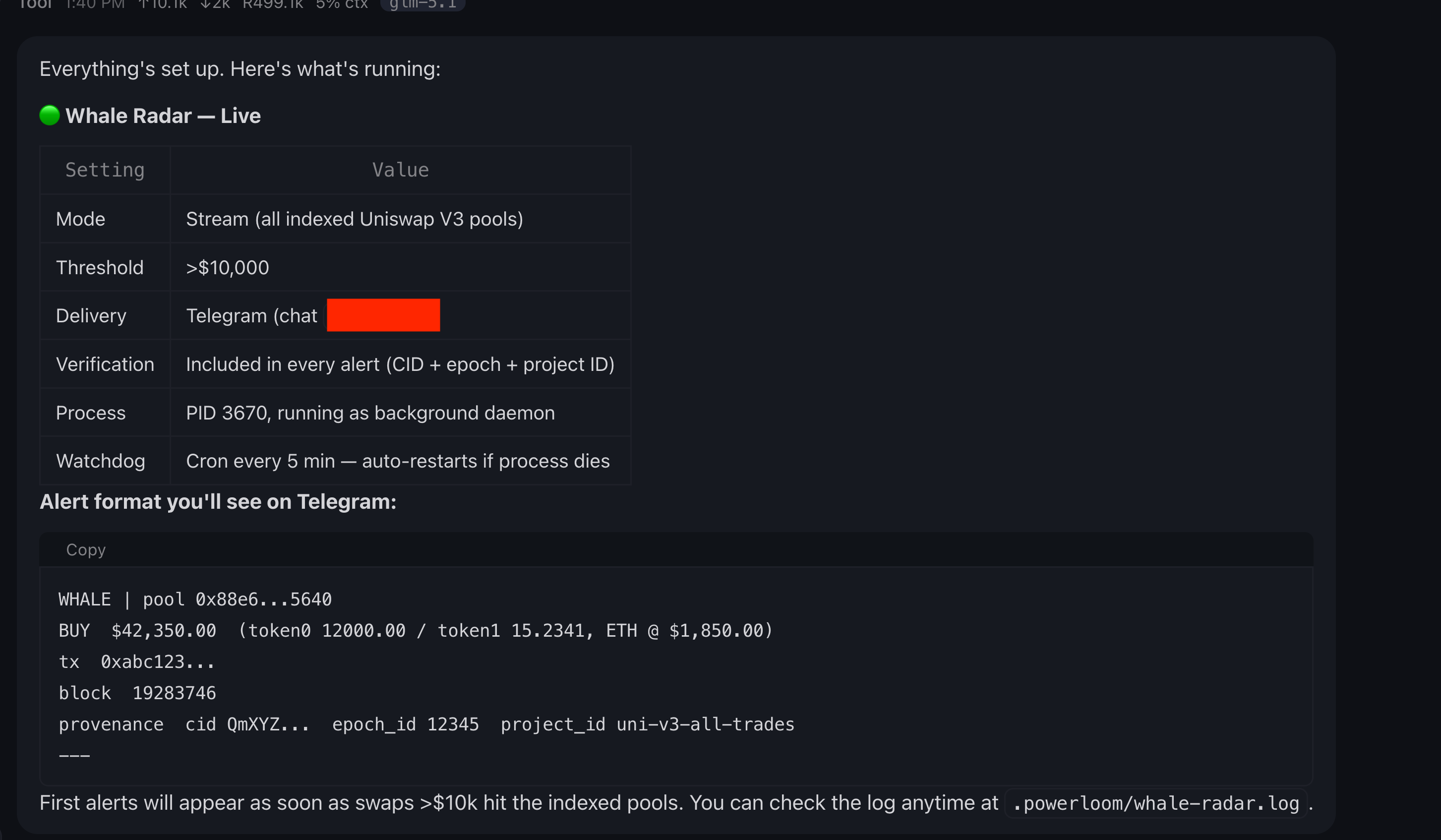
Each alert carries the verification block from result.data.verification:
🐳 Whale alert: WBTC → USDC  $245,000

Pool: 0x99ac8cA7087fA4A2A1FB6357269965A2014ABc17
Epoch: 24785719
✅ Verified on-chain
   cid: bafkrei...
   project: allTradesSnapshot:0x26c4...
Need more credits? Wallet-funded upgrade
The 2 free credits cover roughly 14400 epochs of metered data (1 credit = 7200 epochs). When you want a bigger plan, two upgrade paths:
Option 1 — Top-up the same key. Run bds-agent credits topup (or node scripts/credits-topup.mjs from the skill repo) against your existing sk_live_.... See Top-up.
Option 2 — Run the wallet-funded one-shot. Paste the 08-openclaw-one-shot.md prompt instead of the free-key one. The agent uses the same input-gathering pattern (asks for your private key + Telegram dispatch in chat upfront), then runs scripts/signup-pay.mjs to broadcast a native $POWER transfer on chain 7869 and claim a fresh sk_live_... for the launch_10_pl_power_cgt plan (10 credits + 2 bonus = 12 total).
A successful pay-signup looks like:
[signup-pay] payment_kind=native_value → send native/CGT value to recipient
Submitted tx 0x4a3f...
{
  "api_key": "sk_live_...",
  "org_id": "org_...",
  "credit_balance": 100,
  "plan_id": "launch_10_pl_power_cgt",
  "tx_hash": "0x4a3f...",
  "chain_id": 7869,
  "notice": "Export: export POWERLOOM_API_KEY=<api_key> (do not commit keys)."
}
The wallet-funded prompt sets all six env vars under skills.entries.powerloom-bds-univ3.env.*: POWERLOOM_EVM_PRIVATE_KEY, POWERLOOM_EVM_RPC_URL, POWERLOOM_EVM_CHAIN_ID, POWERLOOM_PLAN_ID, POWERLOOM_TOKEN_SYMBOL, POWERLOOM_API_KEY. Use a burner wallet only for the private key.
Troubleshooting
| Symptom | Fix |
|---|---|
401 on first cron run | POWERLOOM_API_KEY was not set in the cron env — verify it is wired under skills.entries.powerloom-bds-univ3.env.* and the cron message exports it inline |
| Cron ticking with stdout-only alerts after you wanted Telegram | Telegram envs were not gathered before cron creation. Edit the cron message env to add POWERLOOM_TELEGRAM_BOT_TOKEN + POWERLOOM_TELEGRAM_CHAT_ID, or recreate the cron via the same prompt — the input-gathering gate will re-ask |
Timeout on bds_mpp_snapshot_allTrades | Set POWERLOOM_BDS_MCP_CALL_TIMEOUT_MS=120000 in the cron message; the 60s default may be too short under epoch backlog |
| "???" token names | Pool metadata cache not built yet; first run resolves all unknown pools via bds_mpp_pool_pool_address_metadata |
payment_mismatch from signup-pay.mjs (wallet-funded upgrade only) | Ensure payment_kind === "native_value" branch uses sendTransaction({ to, value }) not token.transfer(). This is already handled in the shipped script. |
Path B — 🐍 bds-agent CLI
This is the abbreviated quickstart. For the complete operator guide — every command, every screenshot, environment variables, profile precedence, recipe schema, MCP stdio mode, troubleshooting — see Headless Agentic CLI for BDS.
What you need
- Python 3.12+ with
piporuv(optional: a venv when usingpip) - (Optional, for
signup-pay) A funded EVM wallet on chain 7869
Install
pip install bds-agent
Or from PyPI with uv (isolated tool env, like pipx):
uv tool install bds-agent
bds-agent should be on your PATH after install (for example ~/.local/bin). (Full install options — pip / uv tool install, or clone + uv tool install . for contributors and bundled examples/.)
Sign up — start with the free 2 credits
bds-agent signup
The CLI prompts for your email and agent name, then waits while you complete browser verification:
────────── BDS agent signup ──────────
Email [email protected]  ·  Agent my-bds-agent

╭── Verify your device ──────────────────────────────────╮
│ Open this link in your browser                         │
│                                                        │
│ https://bds-metering.powerloom.io/verify?token=...     │
│                                                        │
│ Enter this code when the page asks                     │
│ ╭──────────────╮                                       │
│ │  ABCD-1234   │                                       │
│ ╰──────────────╯                                       │
╰── Complete verification in browser, then return here ──╯

⣾ Waiting for you to finish in the browser… (Ctrl+C to cancel)
After verification, the sk_live_... API key is saved to ~/.config/bds-agent/profiles/<profile>.json and 2 free credits are credited to your balance — enough to start hitting the metered BDS endpoints. (CLI signup reference)
Configure BDS defaults
bds-agent config init       # writes bds_base_url, catalog URL, verification defaults
bds-agent credits balance   # confirm key is live and balance is non-zero
config init output:
╭── ✓ Defaults applied ─────────────────────────────────────────────────────╮
│  Profile  ~/.config/bds-agent/profiles/default.json                       │
│                                                                            │
│  Setting                           Value                                  │
│  Snapshotter base URL              https://bds.powerloom.io/api           │
│  Endpoints catalog (JSON)          https://raw.githubusercontent.com/...  │
│  Powerloom chain JSON-RPC          https://rpc-v2.powerloom.network/      │
│  ProtocolState contract            0x1d0e010Ff11b781CA1dE34BD25a0037...   │
│  DataMarket contract               0x26c44e5CcEB7Fe69Cffc933838CF402...   │
╰────────────────────────────────────────────────────────────────────────────╯
Set up an LLM backend (for query and create)
bds-agent llm setup anthropic
bds-agent llm use anthropic
bds-agent llm ping
Supported backends: anthropic, openai, ollama (local), local (GGUF), apfel (Apple Intelligence). bds-agent run on existing recipes does not require an LLM. (LLM backend reference)
Run a query or a recipe
Natural language query (no MCP server needed):
bds-agent query "Top 5 Uniswap V3 swaps by USD volume in the last epoch" --execute
Generate a YAML recipe from a description:
bds-agent create "Alert when any single swap exceeds \$100k"
Execute a pre-packaged recipe — examples/dex-alerts.yaml streams indexed DEX swaps and applies min_usd and volume_spike rules. From a PyPI install, download it once then run:
curl -sLO https://raw.githubusercontent.com/powerloom/bds-agent-py/main/examples/dex-alerts.yaml
bds-agent run dex-alerts.yaml --profile default
Set verify: true in any recipe to enable on-chain CID verification per batch. (Recipe reference)
Need more credits? Pay-signup with a funded wallet
bds-agent credits plans
bds-agent credits setup-evm \
# prompts for EVM_PRIVATE_KEY, EVM_RPC_URL, EVM_CHAIN_ID

bds-agent signup-pay \
  --plan-id launch_10_pl_power_cgt \
  --chain-id 7869 \
  --token-symbol POWER
The CLI prints the quote, asks for confirmation, then broadcasts and claims:
Pay-signup quote  plan=launch_10_pl_power_cgt  chain_id=7869
  Send 10000000000000000000 wei (chain native / CGT) to treasury 0x...
  From: 0x<your-wallet>  (expires: 2026-04-27T14:30:00Z)
Broadcast native transfer now? [Y/n]:
tx 0x4a3f...  — claiming API key…

╭── Ready ──────────────────────────────────────────────╮
│ ✓ You are signed in. API key saved securely.          │
│ Profile  default                                      │
│ Organization  org_...                                 │
│ Credentials  ~/.config/bds-agent/profiles/default.json│
╰───────────────────────────────────────────────────────╯
The launch_10_pl_power_cgt plan costs 50 $POWER for 10 credits at the time of writing. Combined with the 2 bonus credits granted on signup, you'll see 12 credits on your balance. (Pay-signup reference)
Path C — ⚡ Aeon fork (GitHub Actions)
Run verified whale radar on a schedule using Aeon + the aeon-skills package. Python prefetch owns BDS fetch and epoch cursor; the LLM only dispatches pre-built alerts via ./notify. No VPS, no MCP server, no cron server.
Full setup guide: Aeon Whale Radar (GitHub Actions)
What you need
- A GitHub account
sk_live_...from Step 0 above (2 free credits)- At least one notify channel (Telegram bot token + chat ID, Discord webhook, or Slack webhook)
Quick summary
- Fork Aeon and enable Actions in fork Settings
- Install the skill:
git clone https://github.com/powerloom/aeon-skills.gitthen runinstall-into-aeon.shagainst your fork - Enable in
aeon.yml: addpowerloom-bds: { enabled: true, schedule: "*/5 * * * *" }underskills: - Set secrets in fork Settings:
BDS_API_KEY(required),TELEGRAM_BOT_TOKEN+TELEGRAM_CHAT_ID(for TG alerts), orDISCORD_WEBHOOK_URL(for Discord) - Commit and push, then verify in Actions tab
First healthy run shows Fetched N snapshot(s) with trades > 0. Subsequent runs catch up block-by-block (max 100 per run).
Each step has screenshots and detailed explanations in the full setup guide. Start there if this is your first time setting up Aeon.
Next steps
- Understand the credit model:
Metering & API Keys - MCP tool reference and other recipes:
OpenClaw & Hosted MCP - Aeon whale radar (GitHub Actions):
Aeon Whale Radar - Headless YAML recipes and LLM backends:
Headless CLI (bds-agent) - Verify a payload on-chain:
Verification in Agent Workflows