Metering & API Keys
Hosted access to the BDS market is metered. Every /mpp/... call against the full-node resolver deducts credits from your balance. The API key you receive after signup is the Bearer token for both direct HTTP access and the hosted MCP server.
Check the Architecture page for a diagram of the metering service and API key flow.
Implementation: powerloom/bds-agenthub-billing-metering
Plans and credit balance
List available plans (no key required). The embed below fetches the live metering service response when this page loads, so it stays aligned with the deployed plan table.
curl -sS https://bds-metering.powerloom.io/credits/plans
Fetched from GET /credits/plans on the metering service.
curl -sS https://bds-metering.powerloom.io/credits/plansLoading latest plans...
Check your balance:
GET https://bds-metering.powerloom.io/credits/balance
Authorization: Bearer sk_live_...
Or via CLI:
bds-agent credits balance
Signup
All signup paths lead to the same metering service at https://bds-metering.powerloom.io/metering.
Browser signup (free — 2 credits included)
The 2 free credits work identically to paid credits. Same API, same verification objects, same key format. If you want to explore what BDS data looks like before committing any tokens, this is the fastest path.
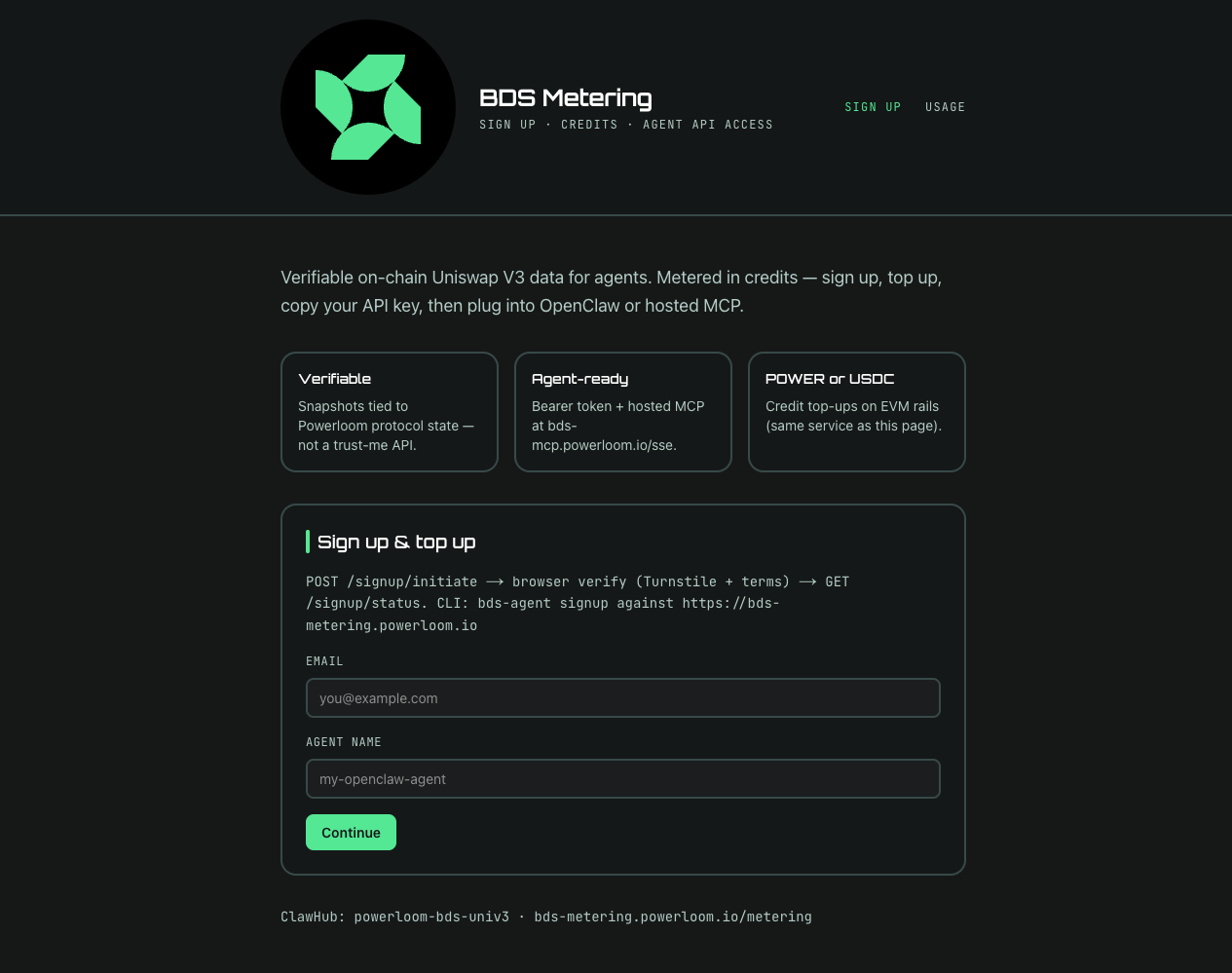
You can sign up directly in the browser at bds-metering.powerloom.io/metering — no CLI required. The signup page features a dark-themed interface with Powerloom branding, a hero section highlighting three value cards — Verifiable, Agent-ready, and POWER or USDC — and a subtitle describing verifiable on-chain Uniswap V3 data for agents. Enter your email and agent name on the SIGN UP tab, complete Cloudflare Turnstile verification, and your API key is displayed immediately.
Video walkthrough: Free API key for BDS: Browser Signup · BDS & Agents playlist
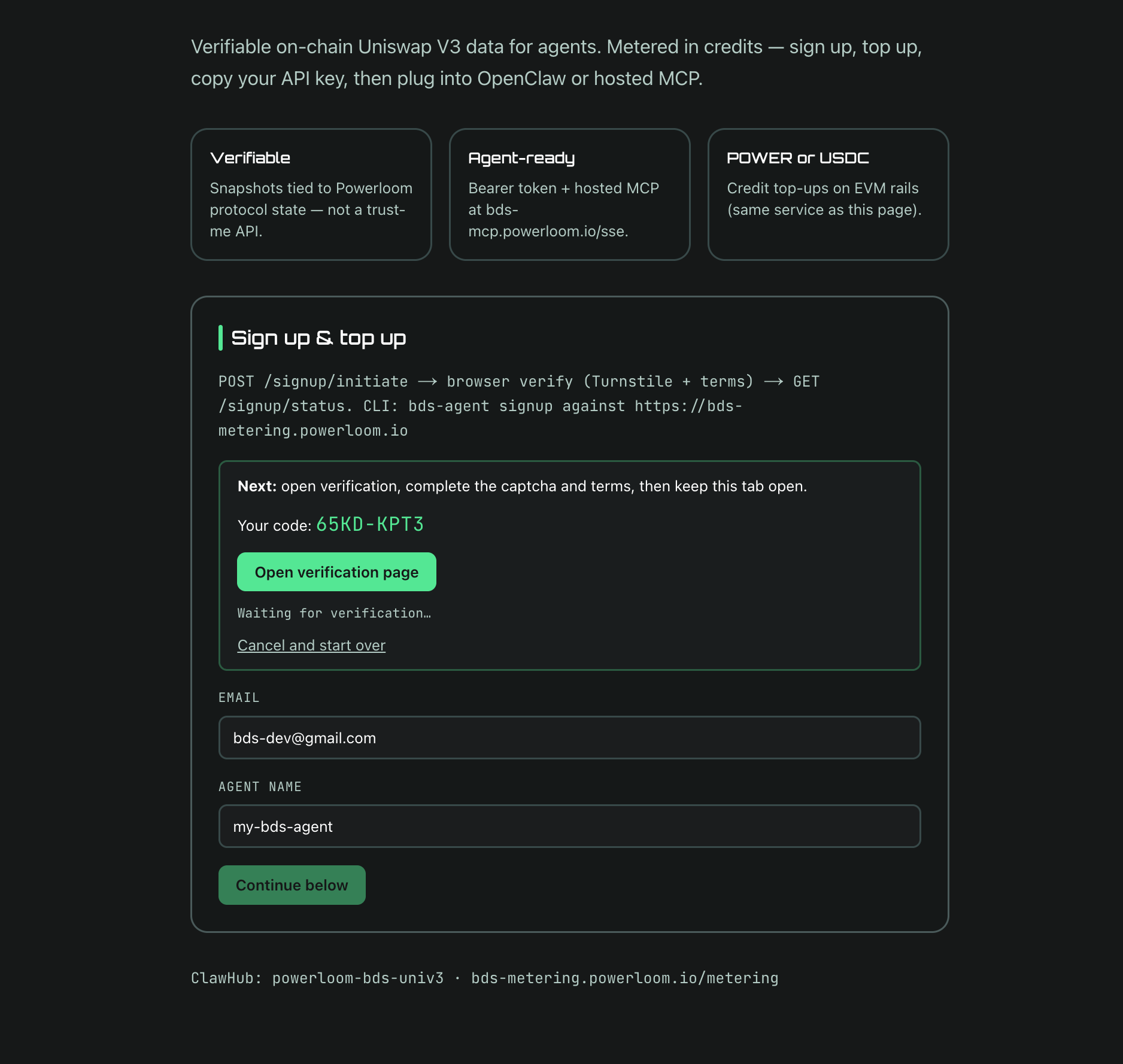
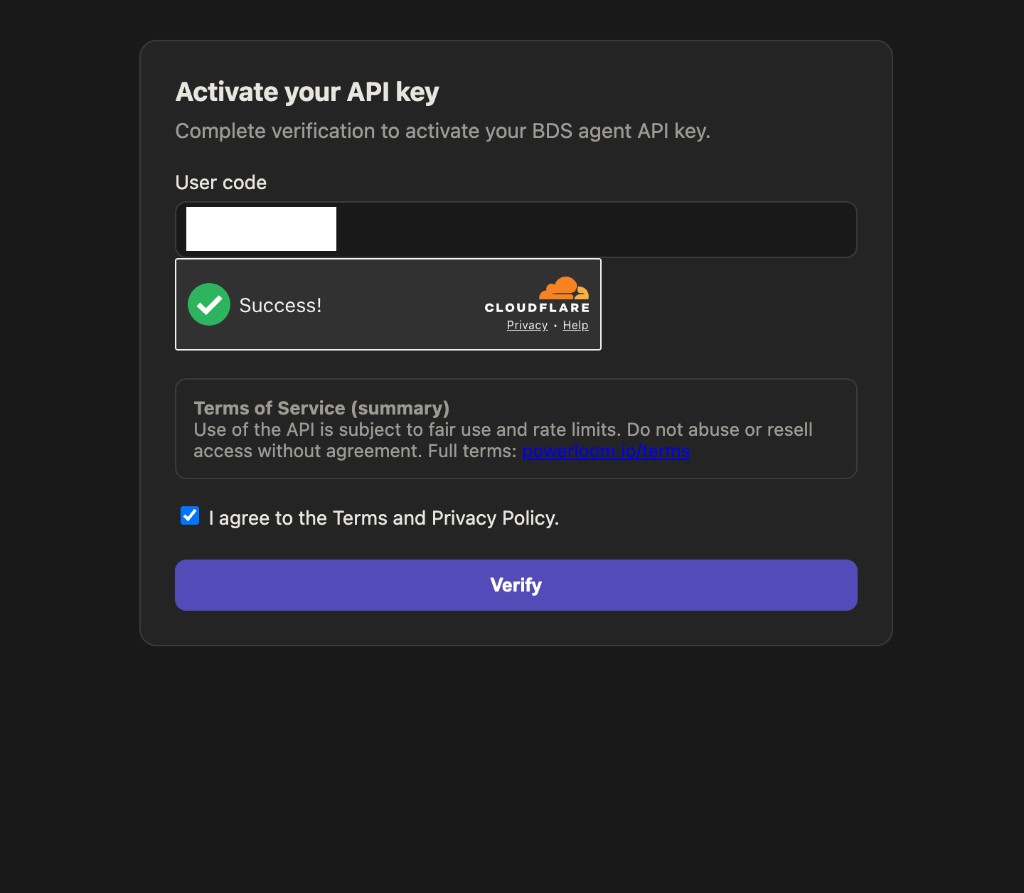
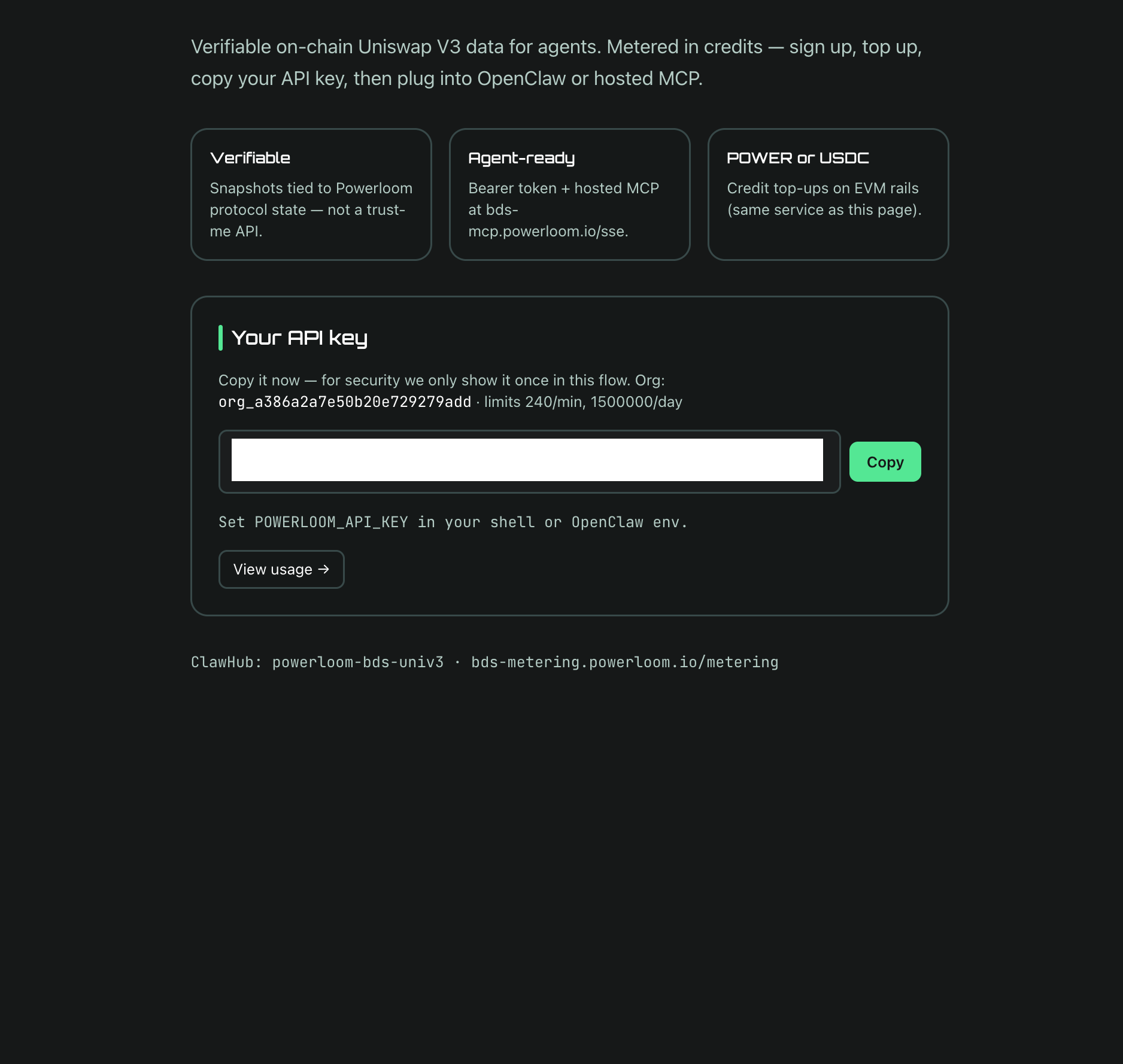
Alternatively, use the CLI: bds-agent signup runs the same device flow from the terminal.
For complete CLI instructions, see the Headless Agentic CLI for BDS page.
What you can do with 2 free credits:
- Headless —
bds-agent query,bds-agent runagainst any pre-packaged recipe, or directcurlagainst/mpp/...routes. See Quickstart Path B. - OpenClaw, no wallet — paste your
sk_live_...into the free-key one-shot prompt and the agent installs thepowerloom-bds-univ3skill, wires the key, and creates a Whale Radar cron with onchain verification in every alert. See Quickstart Path A. - Hosted MCP, any framework — point Claude Code, Cursor, LangGraph, CrewAI, or any SSE-MCP-capable client at
https://bds-mcp.powerloom.io/ssewithAuthorization: Bearer sk_live_.... See OpenClaw & Hosted MCP.
The same sk_live_... works across all three surfaces. Top up with native $POWER (or any supported plan token) when the 2 credits run out — see Top-up below; no re-onboarding required.
Pay-signup (agent-first, no browser)
For automated or headless signup, use the pay-signup API directly. This requires a funded EVM wallet.
HTTP flow:
GET /credits/plans— discover available plans:id,chain_id,token_symbol,payment_kind(erc20ornative_value).POST /signup/pay/quote— supplyagent_name,plan_id,chain_id,token_symbol,payer_address. Returnssignup_nonce,recipient,amount_atomic.- Pay on-chain — transfer tokens to
recipientforamount_atomic(ERC-20 or native perpayment_kind). POST /signup/pay/claim— supplysignup_nonceandtx_hash. Returnsapi_key.
Using bds-agent:
bds-agent credits plans
bds-agent credits setup-evm          # saves wallet creds to profile
bds-agent signup-pay \
  --plan-id <id> \
  --chain-id <chain> \
  --token-symbol <SYMBOL>
bds-agent credits balance
The bds-agent CLI is a reference client for the same HTTP flow; both paths issue an identical sk_live_... key.
Rotate a lost API key (pay-signup wallet)
This only applies if you created your account with pay-signup (on-chain payment). The server stores your wallet as payer_address and never stores the raw API secret.
How the server knows it is you
- You request a challenge:
POST /api-key/recover/challengewith{ "address": "0x..." }. The server checks that a non-revoked API key exists for thatpayer_address. - It returns a single-use
nonce, an exactmessagestring (includes your address, nonce, expiry, and terms URL), and persists that message server-side. - You sign
messagewith the EIP-191 wallet flow (personal_sign/signMessage). A valid signature for that address is treated as proof of control of the pay-signup wallet. - You submit
POST /api-key/recover/verifywith{ "address", "nonce", "signature" }. The service verifies the signature against the stored challenge text, then replacesapi_key_hashwith a new key and returns the newsk_live_...once. The previous key stops working immediately.
Email/browser signup keys are not tied to payer_address; use normal signup support flows for those accounts.
OpenClaw and other MCP users
The hosted MCP server only accepts an existing Bearer key; it does not run the rotation HTTP flow for you. After you rotate, update POWERLOOM_API_KEY (or your client config) with the new sk_live_....
Script (Node, metering repo)
From a checkout of powerloom/bds-agenthub-billing-metering:
npm install
METERING_BASE_URL=https://bds-metering.powerloom.io \
WALLET_PRIVATE_KEY=0x... \
npm run rotate-api-key
The script prints the new key on stdout. Use --base-url=https://... instead of METERING_BASE_URL if you prefer.
Agents
Any agent that already holds the pay-signup wallet can automate the same two POSTs plus signMessage; there is no separate MCP tool for rotation today.
Pay-signup with OpenClaw
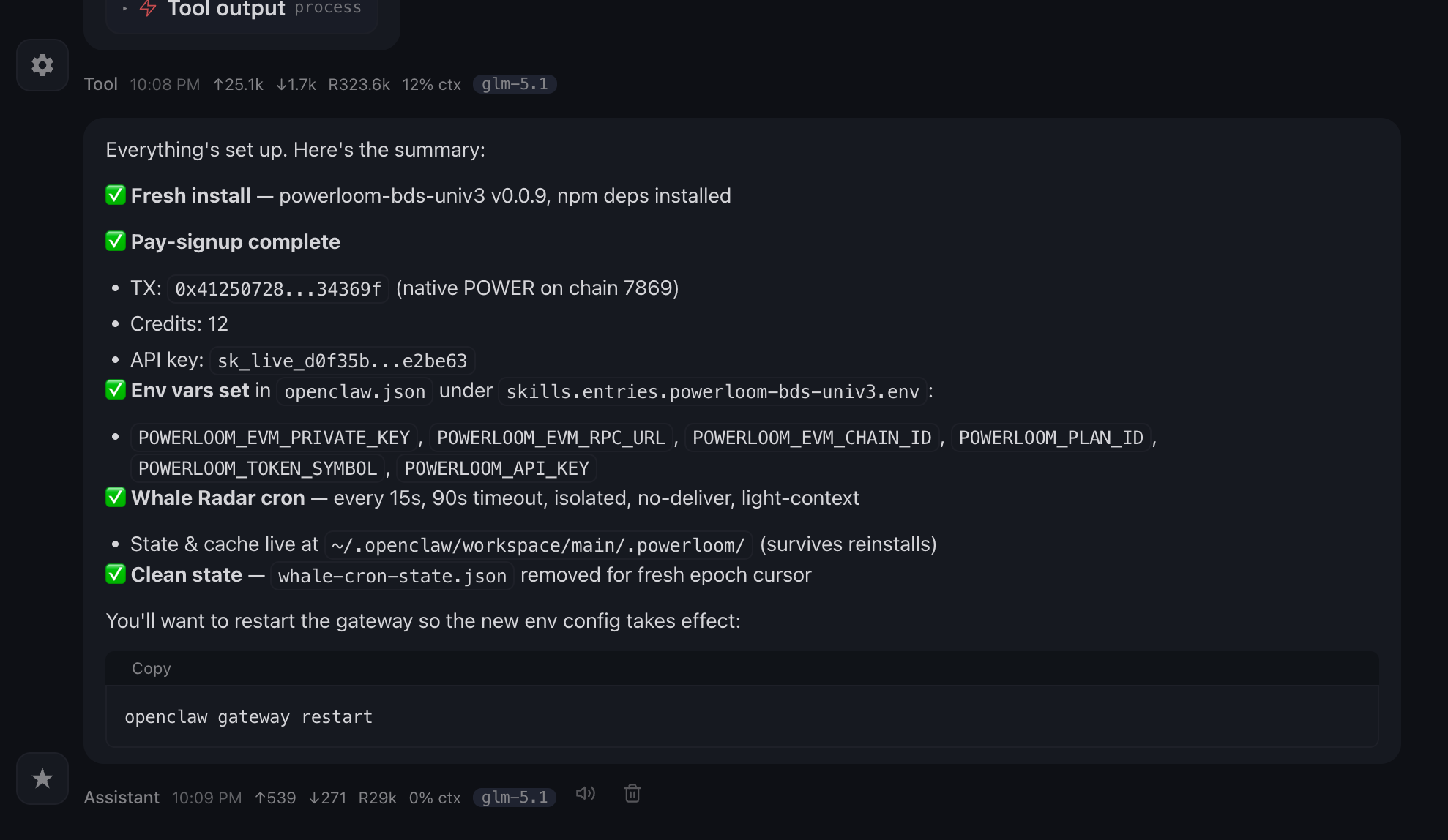
If you use OpenClaw and want autonomous wallet-funded onboarding (50 $POWER for the launch plan = 10 credits + 2 bonus = 12 total), the powerloom-bds-univ3 skill ships a one-shot prompt that installs the skill, runs signup-pay.mjs against your wallet, claims the API key, wires env, and creates a Whale Radar cron — all from a single message.
You don't need a wallet to use OpenClaw with this skill. Run bds-agent signup for a free sk_live_... (2 credits, browser device flow) and use the free-key one-shot prompt instead. Same skill, same cron, same verification — no on-chain payment.
The first step is to install the skill from ClawHub, and is a subset of the one-shot prompt for installing the skill and running the pay-signup and cron setup.
You can copy the same prompt from the skill page by selecting the "Copy Prompt" button on the skill page. with the option to Install & Setup instead of Install Only.
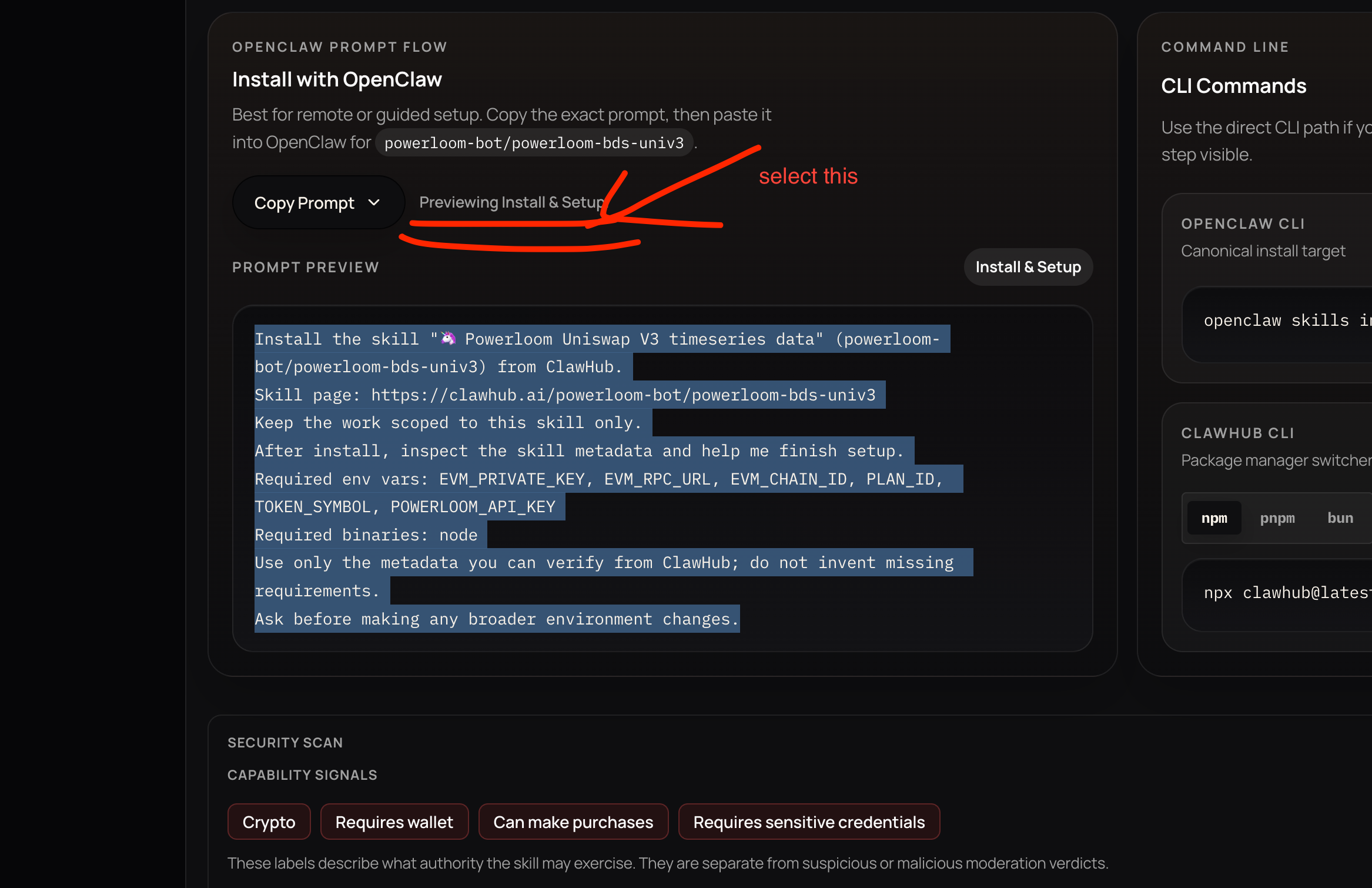
You will be prompted just once most likely to only provide the private key of the wallet you want to use for the pay-signup.
- We recommend using burner wallets for the pay-signup and topup to avoid any risk of losing funds.
- It is always a good idea to setup a micro top-up and dispatcher service to fund and topup such wallets automatically.
Successfully installed and setup
Top-up
Top-up adds credits to an existing key without creating a new account. It uses the same on-chain payment pattern as pay-signup.
Top-up with OpenClaw
If you use OpenClaw, you can use the OpenClaw skill to topup credits.
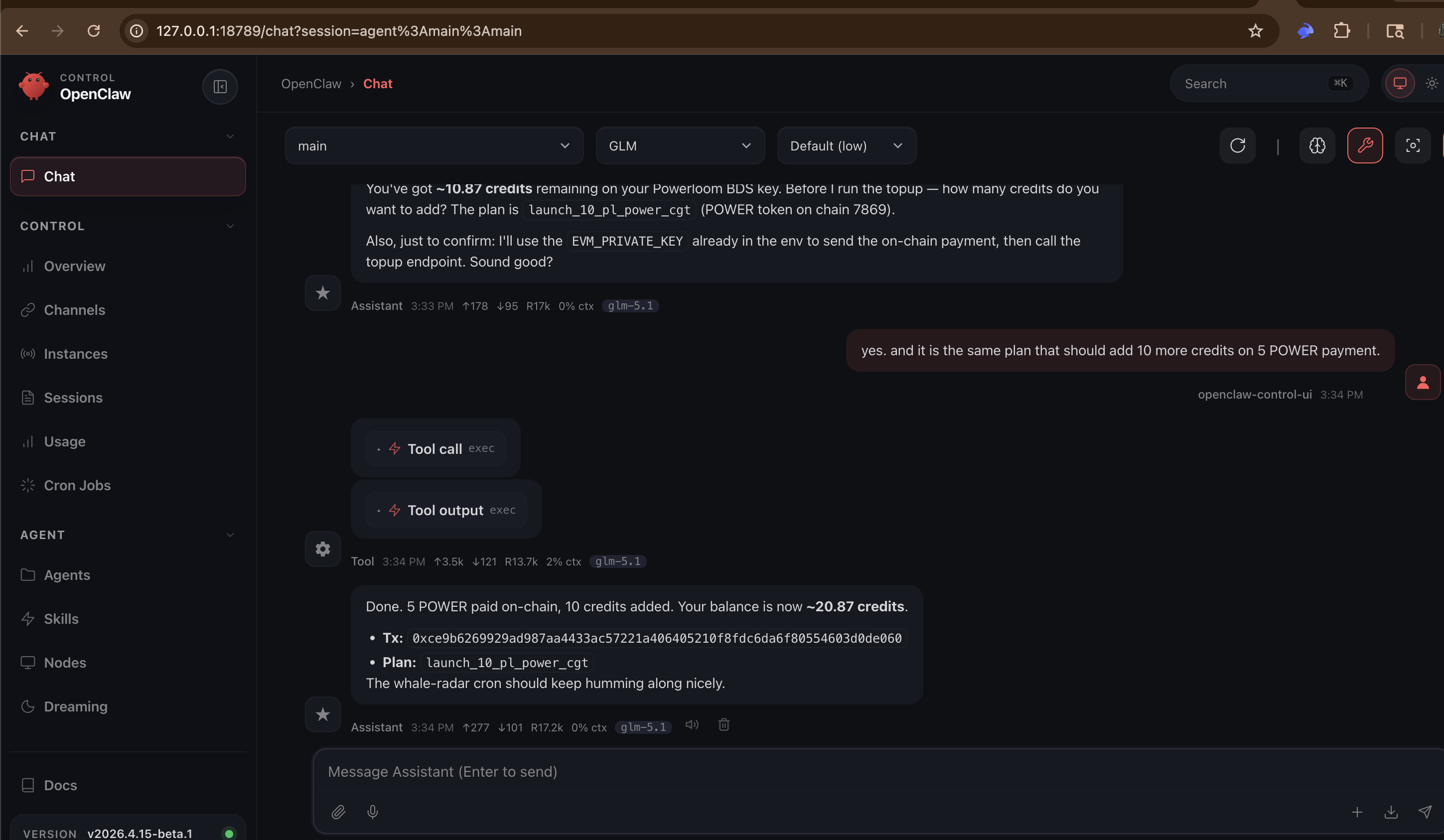
HTTP:
POST /credits/topup
Authorization: Bearer sk_live_...
{ "plan_id": "...", "chain_id": "...", "tx_hash": "0x..." }
CLI:
bds-agent credits setup-evm           # if not already saved
bds-agent credits topup
The powerloom-bds-univ3 skill also ships node scripts/credits-topup.mjs for Node-only environments — same gate as signup-pay.mjs: --dry-run, then --yes on the broadcast invocation (preferred over persisting confirmation env vars in OpenClaw); CI may use POWERLOOM_CREDITS_TOPUP_CONFIRM=yes once.
How credits are consumed
Credits are deducted when the full-node resolver processes a metered /mpp/... request. This happens whether the request comes from:
- a direct HTTP call with
Authorization: Bearer, - the hosted MCP server forwarding a tool call on your behalf, or
bds-agent runexecuting a YAML recipe.
The hosted MCP server does not apply a separate charge layer. It forwards your Bearer token to the resolver, which applies the standard metering deduction. MCP tool access is gated by the same key and balance state.
A balance at or below zero causes the resolver to return 402. The hosted MCP server propagates this back to the MCP client. Scripts in powerloom-bds-univ3 call get_credit_balance before each recipe run to surface this before it becomes a mid-run 402.
How much each call costs
Pricing is not one flat rate for every /mpp/ route. Your balance is debited when the resolver accepts a metered request. Per-route credit_weight, stream session rates, and time-series lookback tiers all come from one place:
→ Endpoint Catalog — Credit weights (live table from api/endpoints.json)
Credit plan (summary):
- Typical GET (weight 1): 1/7200 of a credit per request — about 7200 such calls per 1 credit.
- Heavier routes: multiply that base by the route’s catalog weight (e.g. weight 10 → 10/7200 credits per call).
- SSE stream (
/mpp/stream/allTrades): 0.01 credits per connection when the stream opens (not per event on the wire). - Time series (
/mpp/timeSeries/...): weight 5 × a lookback multiplier by window — see Endpoint Catalog → Time series lookback.
Pulse trader (bds-agent trade run): GET /mpp/stream/allTrades for the session, plus GET /mpp/tokenPrices/... each epoch with default --price-source usd. No separate Pulse or CLI fee — only catalog-priced routes.
YAML / MCP agents: many recipes use bds_stream → the same stream endpoint; you pay the session rate above, not per SSE message.
Monitor spend with bds-agent credits usage by-endpoint or the Usage Dashboard Top endpoints table. Plans above are how you buy more credits.
Usage and account dashboard
Inspect credit usage per API key:
curl -sS "https://bds-metering.powerloom.io/credits/usage/summary?days=30" \
  -H "Authorization: Bearer sk_live_..."
The response includes daily totals and a by_endpoint breakdown (calls and credits per BDS route template).
Or via CLI:
bds-agent credits usage
bds-agent credits usage summary --days 30
Browser dashboard: navigate to the USAGE tab at bds-metering.powerloom.io/metering/account, paste your API key (stored in sessionStorage only), and view balance, usage-by-day, top endpoints, and recent activity. See the Usage Dashboard section below for a full walkthrough with screenshots.
Usage Dashboard
The USAGE tab at bds-metering.powerloom.io/metering/account provides a browser-based dashboard for monitoring credit consumption in real time. You unlock the dashboard by pasting your sk_live_... API key into the prompt — the key is stored in sessionStorage only (never persisted to disk or sent to a third party).
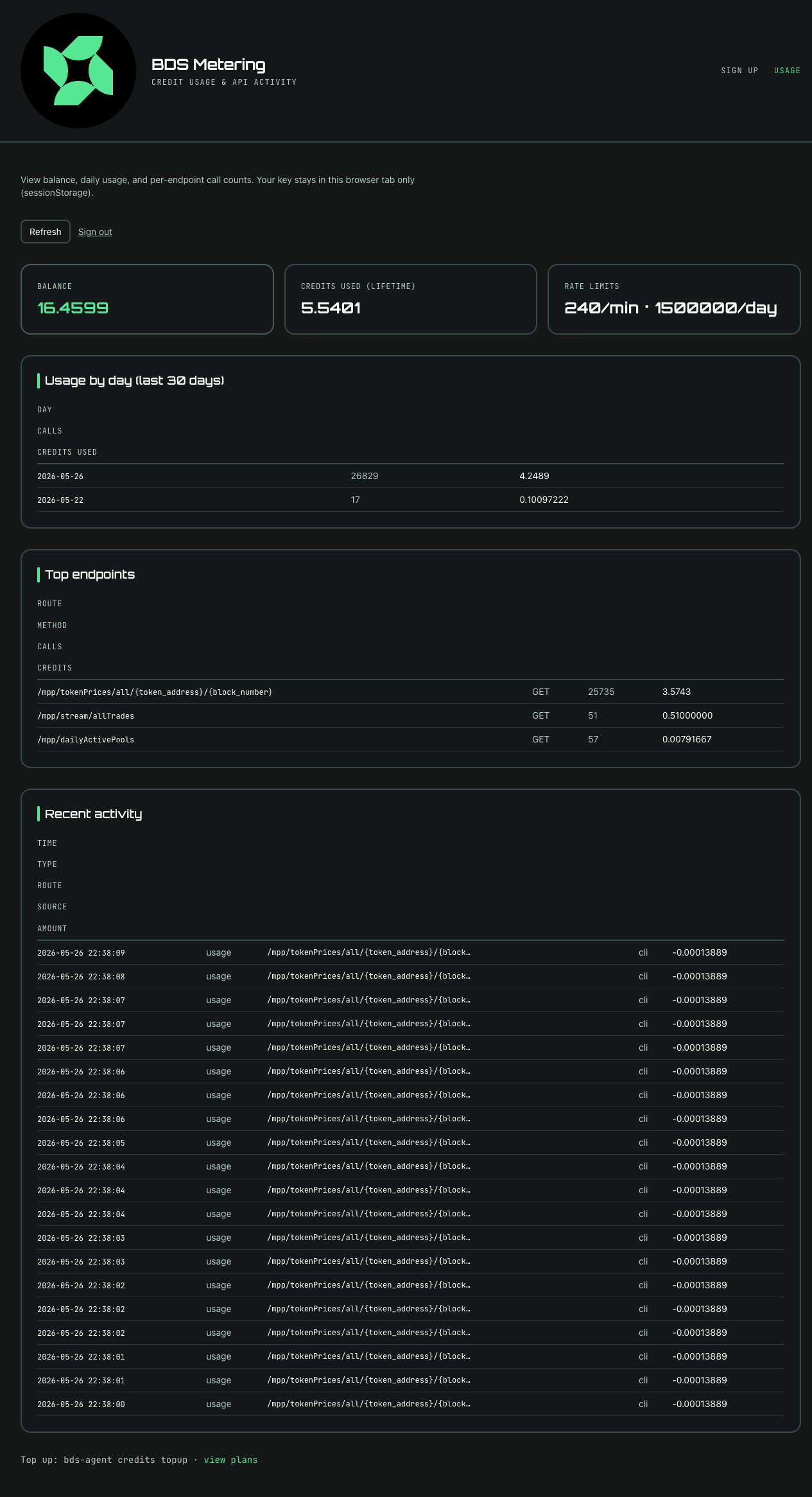
The dashboard displays the following cards and tables:
| Card / Table | Details |
|---|---|
| Balance | Current remaining credits (e.g. 16.4599 credits). |
| Credits Used (Lifetime) | Total credits consumed since account creation (e.g. 5.5401). |
| Rate Limits | Per-minute and per-day request caps (e.g. 240/min · 1,500,000/day). |
| Usage by day (last 30 days) | Table with columns DAY · CALLS · CREDITS USED — daily aggregate of metered requests. |
| Top endpoints | Table with columns ROUTE · METHOD · CALLS · CREDITS — ranked by credit consumption. Common routes include /mpp/tokenPrices/all/{token_address}/{block_number}, /mpp/stream/allTrades, and /mpp/dailyActivePools. |
| Recent activity | Table with columns TIME · TYPE · ROUTE · SOURCE · AMOUNT — individual metering events with timestamps and sources (e.g. cli). |
The dashboard also provides Refresh and Sign out buttons. Signing out clears the API key from sessionStorage.
POWER token discount
Credit plans priced in POWER (the Powerloom coordination token) carry a bulk discount relative to USDC plans. See GET /credits/plans for the current price matrix across available chains and token symbols.